




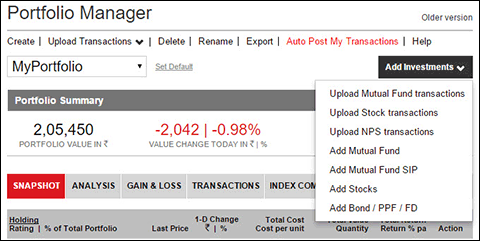
Now get all the benefits of tracking your fund and stock investments on Value Research Online without having to enter the transactions manually. Just import your transactions from the Excel or PDF files downloaded from your registrar or broker. To try out the portfolio-upload feature, go to the Portfolio Manager, and click on the new flashing 'Upload Transactions' link that you see at the top. All relevant instructions will appear as you use the feature.
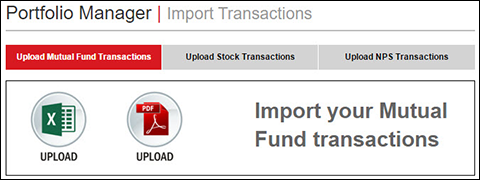
How to get your transaction file for mutual funds: Download your consolidated transaction statement in the Excel or PDF format from CAMS or Karvy (the URLs are case sensitive). Choose the 'Detailed Transaction Statement' option before downloading the file. Select the specific period and punch in the dates when you started investing to get a complete history of your transactions on your email address. You can also prepare or modify Excel files yourselves! You can create your own Excel file with the following information: fund name, date of transaction, number of units transacted or transaction amount, and transaction type (buy, sell, SIP, SWP, STP).
How to get your transaction file for stocks: Ask your broker for it or download a complete transaction detail from your online brokerage account. The file should contain the transaction details and not just the current holdings summary.
It should contain stock names or BSE or NSE symbols, transaction dates, transaction type (buy or sell), quantities and prices of transactions. If you are not able to get the file, you can create your own Excel file containing the above-mentioned details, wherein you can also enter the brokerage amount.
Things to note
- You can upload transactions in a new portfolio or in an existing portfolio.
- Any transaction information can be edited after importing the transaction history.
- Your SIP, STP, SWP and switch transactions will be accurately reflected.
- You can upload up to 3,000 transactions in one go.
- Password-protected transaction files can also be imported. You will be prompted to provide the password.
The Payoff: Track your fund and stock investments without any tedious data-entry exercise.
This article was originally published on November 28, 2017.
Ask Value Research 
 New episodes every Friday

 New Process Alert
  Seems like you've uploaded a wrong QR code. Please upload the QR code downloaded from MF Central platform.


