




Step 1
An overview of your portfolio
Tracking your portfolio is as much important as choosing what stocks and funds you want to have in your portfolio. A quick overview and analysis of the stocks and funds that you have can go a long way in improving your investment results as you will be able to monitor them effectively.
Step 2
Get details in one place
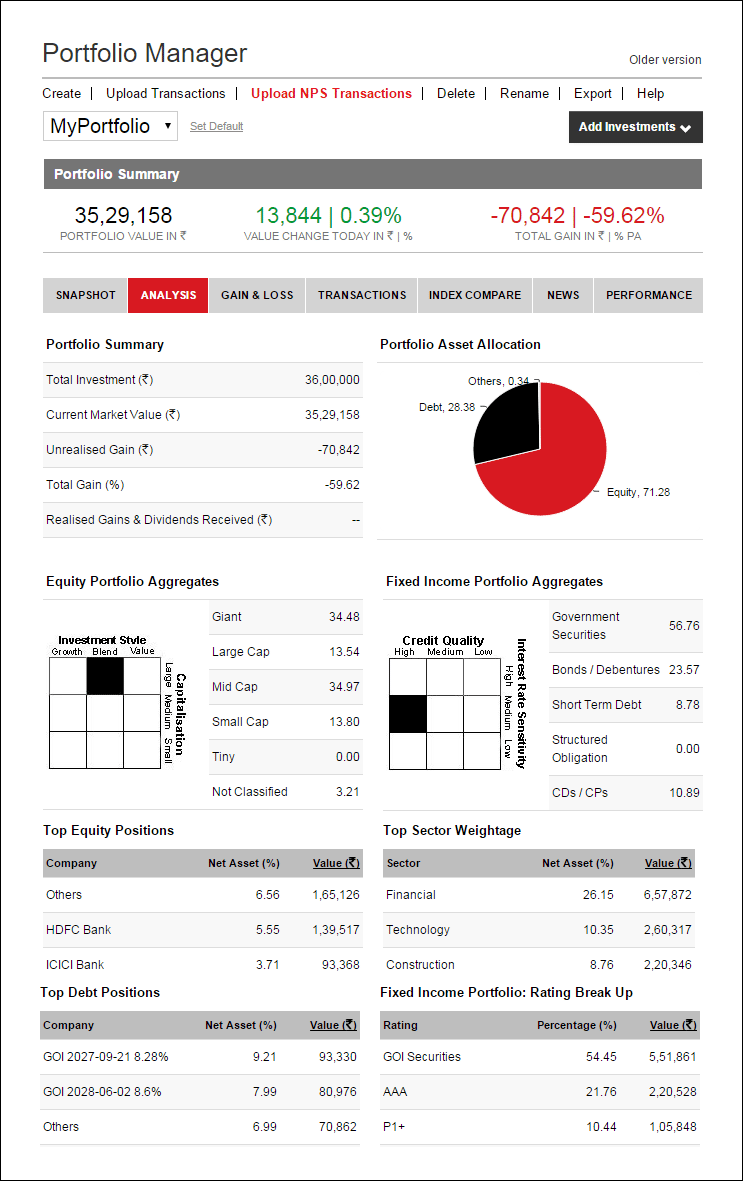
One place that will give you such an overview in a succinct manner is the Analysis tab of the Value Research Portfolio Manager. Once you create a free user account on www.ValueResearchOnline.com, you can enter the details of your funds and stocks into Portfolio Manager. Then, head over to the Analysis tab and you'll find a set of details that are enough for you to evaluate your investments, without getting into too many technicalities.
Step 3
Analyse and take decisions
Portfolio Summary tells you the status of your invested amount. The Asset Allocation pie-chart shows allocations in equity, debt and cash. You learn about the portfolio's investment style and top holdings. In case of debt investments, the tab shows top debt positions and a rating break-up. You can learn if the portfolio is aggressive or conservative, if it has a growth or a value tilt. You can also make out if you are over-exposed to certain stocks/sectors.
The Payoff: A deeper understanding of your investments, leading to better investment decisions
This article was originally published on December 26, 2017.
Ask Value Research 

 New episodes every Friday

 New Process Alert
  Seems like you've uploaded a wrong QR code. Please upload the QR code downloaded from MF Central platform.


